
Every detail that goes into
finding a file by name
Nothing here is filler. Every capability serves the same end: getting you to that file faster.
As you type, with no submit button
Try filtering as you type in the interactive demo below, using sample file names.
| Name | Path | Size | Modified | Created | Kind |
|---|
↑ Type in it. Live filtering of 10,000 generated file names in your browser — not an app screenshot.
Matches highlight instantly
Every keystroke narrows the list, and the matching fragment lights up inside the file name.
Searchable while scanning
Your everyday folders are searchable before the first full index finishes. No waiting.
Speed you can see
The status bar shows the result count and how long this search took — every single time.
One line, and the results narrow
Beyond keywords, describe exactly what you want with operators. They autocomplete as you type, get syntax-coloured, and show up as visual filter chips.
Precision in the free tier
- Multiple keywords mean all of them must match; case-insensitive
ext:pdfby extensionunder:"/Users/you/Documents/Work"pins results to one exact folder tree, never catchingWork-old. It needs an absolute path — pasting the full path from Finder is the fastest wayhidden:/package:to look only at hidden items, or only inside bundlestag:Redby Finder tagcode/report— a keyword with a/matches a path fragment
Advanced queries PRO
kind:imageby kind (image / video / audio / document / archive / code / application / folder)size:>100mbcomparisons and rangesa..bdate:today/>2026-01by modification time;created:by creation timein:Projectspath contains;!exclude;|or;*?wildcards/^IMG_\d{4}\.jpg$/orregex:; appendcto the slash form for case sensitivity
It learns your habits PRO
Learned ranking floats the files you open often — and the ones you open repeatedly from the same query — closer to the top. Frequently used queries can be pinned for one-step access.
That data lives only on this Mac and never goes online. Turn it off or wipe it in Settings at any time — it serves you, it does not belong to us.
Too many results? One click on the left
No syntax to remember. The sidebar groups the current results by location, kind, date and size, each row with a live count. Click once and only the files you want are left.
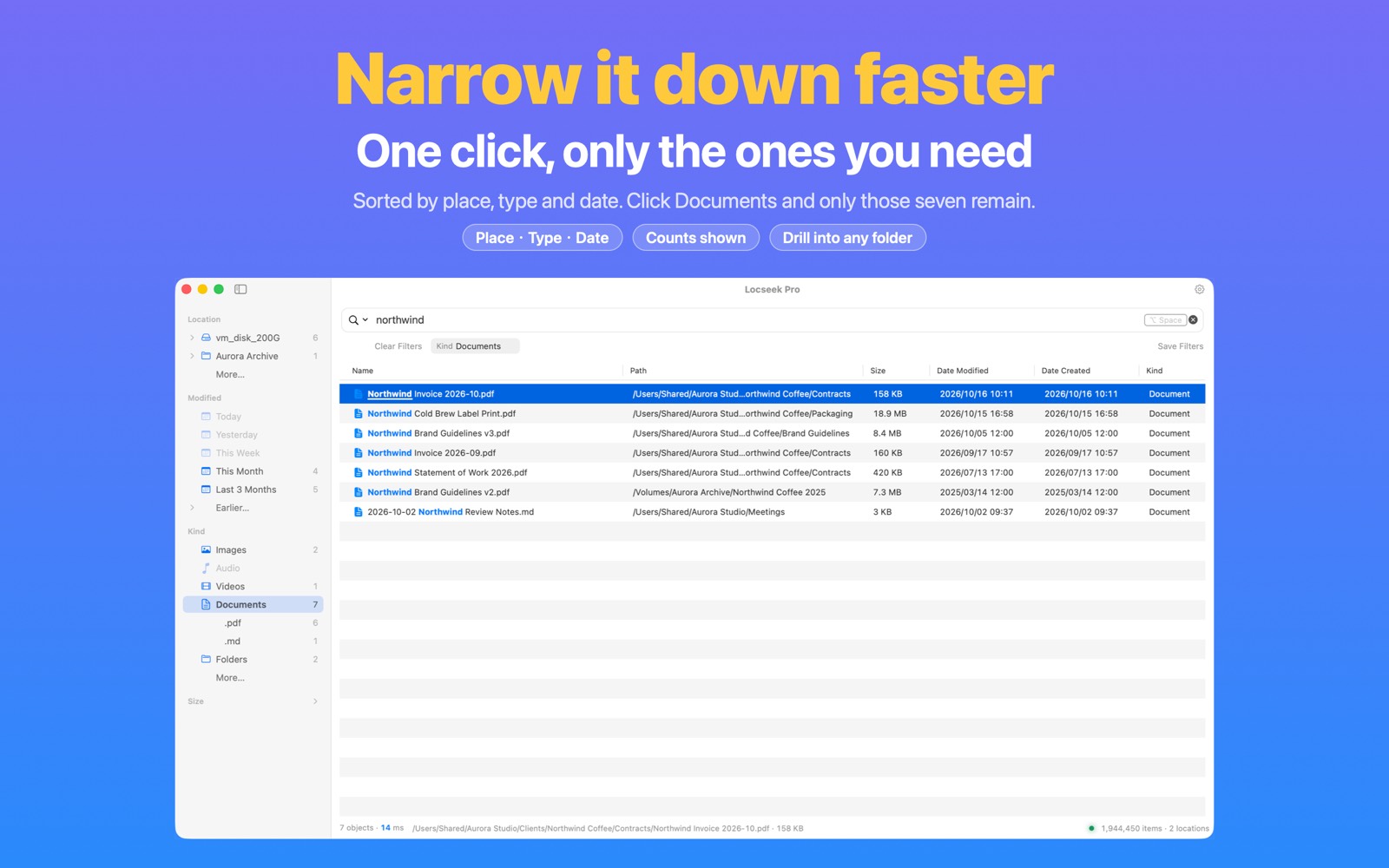
Four groups, drill down as far as you like
- Location: a folder tree — expand it level by level and click the folder you mean
- Kind: images, videos, audio, documents, folders… then narrow to a single extension
- Date: Today, Yesterday, This Week, Last 3 Months… by modification or creation date
- Size: from Under 1 MB to Over 1 GB
Filters you can see — and remove
Every filter you click stays visible under the search field, where you can drop it one at a time or hit "Clear Filters". The search field keeps only what you typed — no cryptic syntax gets written into it.
Save a set you use often with "Save Filters" and bring it back with one click. Reorder the groups, or hide the ones you never use.
Free and Pro PRO
The free tier gets the Location group plus Images and PDFs under Kind. The other kinds, the Date and Size groups, and right-click "Exclude Folder / Type / Range" are Pro.
Keyboard too: ⌥⌘S shows or hides the sidebar, → ← expand and collapse groups.
No more digging through folders
Right-click any result (or a multi-selection) to rename, move, compress or tag it right there. The list updates the moment you are done, and ⌘Z takes back a slip.
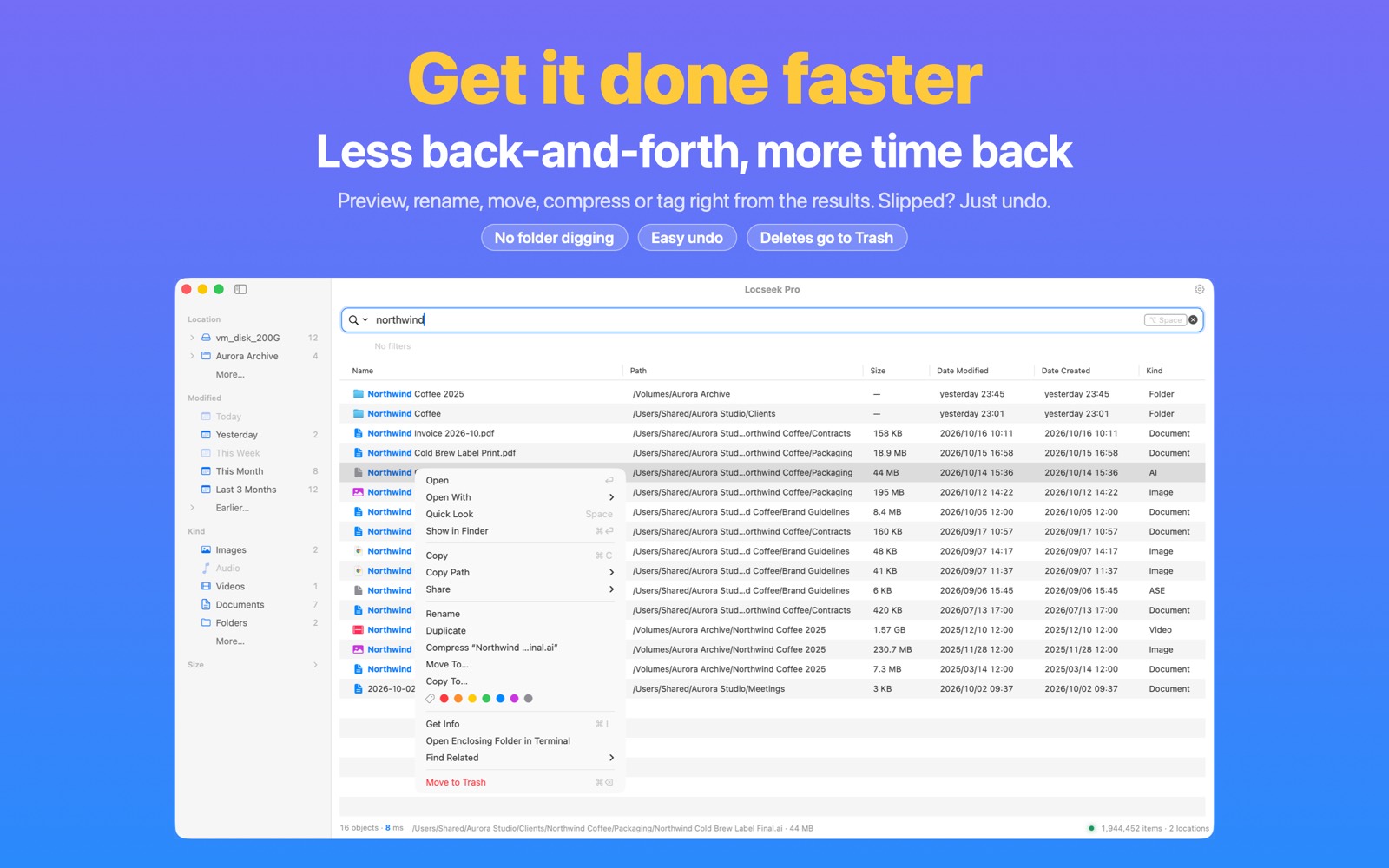
In the free tier
- Open, Open With, Quick Look, Show in Finder
- Copy the file, copy its path or name, Share
- Rename, Duplicate, Get Info, Open in Terminal
- Find Related: same folder, same extension, same name
- Move to Trash (up to 10 items at a time)
More file actions and related searches PRO
- Batch rename
- Move To… / Copy To… for individual files or selections
- Compress individual files or selections
- Add or remove Finder tags on individual files or selections
- Find files modified or created the same day
- Open and Move to Trash with no item limit
Safe to press
- Rename, duplicate, compress, move, copy, tag and Move to Trash can all be undone with ⌘Z
- A name clash is skipped, never overwritten — and you are told how many were skipped
- There is no "delete permanently": anything removed goes to the system Trash
- Search uses names and metadata without reading file contents. File actions run only when you choose them.
From summon to Finder without leaving the keys
⌥Space to summon
Rebind the global hotkey to whatever you like. It lives in the menu bar, ready whenever you are. If another app already owns the combo, Locseek says which one and offers alternatives that work — one click to switch.
Type + ↑↓
Results narrow instantly; arrow keys select, ⇧ extends the selection, ⌘1–9 opens that result directly.
Space to preview
System Quick Look, right there — press ↑↓ while it is open to step through files. Confirm it is the one before you open it.
⌘Return to land
Reveal in Finder, or Return to open. It delivers you, then gets out of the way.
You just moved that file — it already knows
It watches every change in the locations you granted: created, renamed, moved, deleted — searchable moments later. No manual refresh, no scheduled rebuilds.
- Every corner you granted is remembered — hidden files and the inside of
.appbundles are in scope by default - After startup-disk authorization and Full Disk Access setup in Pro, cloud placeholder names become searchable without downloading their contents. You can still exclude these locations in Rules; results mark placeholders "Not downloaded". The system downloads a file only when you open it. Read about the scope →
- A location going offline (drive unplugged, NAS down) is not a deletion: the names already indexed stay searchable, dimmed and marked "Not connected"; reconnect and the changes made meanwhile are caught up automatically
- After an unexpected restart, Locseek checks and recovers its index, rebuilding when needed
It will not interrupt your work to do its own
The easiest mistake a search tool can make is asking you to worry about its index. Locseek keeps all of that backstage.
Change a setting, this search changes
Hidden items, package contents, exclusions, narrowing to a location — the change applies to the search in front of you immediately. No rescan, no index rewrite, no "waiting for settings to take effect". Relax a setting again and the complete results come straight back.
That status-bar number is real
It always means "items you can actually search right now". It does not drop to zero during a scan or masquerade as a progress bar; building or rebuilding is stated in words rather than letting the digits jitter.
Housekeeping usually waits for idle time
Index consolidation normally waits for idle time to reduce interruptions. It may also run when pending changes reach an urgent threshold. Background event storms are combined before processing.
Unplugged is not deleted
When an external drive, NAS or network share goes offline, the names of its files stay searchable — dimmed and marked "Not connected", so you know which drive to plug in. Prefer not to see them? Turn that off in Settings › Search. Reconnect and indexing resumes on its own; to confirm right away, click "Check Connection" and you are told plainly if it still can't be found. If the authorization itself lapsed, you get a "Reauthorize…" button. Searching external drives and NAS →
Small conveniences that add up
An empty search field shows your recently opened files and a collapsible "Tips" cheat sheet; ⌥↓ opens saved and recent searches. Operators complete on Tab (ex → ext:), and ⌫ removes the last filter.
No trip back to the search field
Type while the result list has focus and the characters flow back into the search field. On the first row, ↑ returns you to the field. Right-click any result to "Search in This Folder" and narrow in one step.
When three folders cannot hold your world
The free tier covers any combination of Desktop, Documents and Downloads. Pro takes the same speed and accuracy from "a few folders" to "any location".
Search anywhere
The entire startup disk, any folder, external drives, USB sticks, NAS and network shares — all in one instant index. Authorize each location you add. Searching protected folders on the startup disk also requires Full Disk Access.
Filter by anything, act in bulk
Every sidebar group — kinds, dates, sizes — plus kind:, regex, size, date, explicit in: path queries, exclusions, OR and wildcards. Then batch rename, move, copy, compress or tag what you found. The result limit goes from 1,000 up to a configurable 30,000.
Ranking and scope, yours
Learned ranking lifts your frequent files; you decide what gets excluded — including allowing cloud file names and app private data, which additionally need Full Disk Access — or exclude a folder straight from the sidebar. All of it can be switched off and wiped.